The Journey of My First UX Project: Initial Research, Personas, and Competitive Audit
A mini case study documenting how I chose my first UX project, conducted user interviews with ChatGPT, built personas, and ran a competitive audit — all while studying the Google UX Design Certificate.

My journey into UX has been exciting and scary at times. I often find myself having trouble recognizing the work that I have done. I have completed the first two courses in the Google UX Design Certificate over on Coursera, and this post is to document my experience with these courses and the progress I have made so far! A mini-case study that I will later include in a much larger, much better case study. This post will include the following aspects of my journey:
- Choosing my project
- User Interview Preparation
- Conducting User Interviews with ChatGPT
- Documenting My Research
- Creating Personas
- Creating a value proposition
- Conducting a Competitive Audit
The course has you use Sharpen’s Design Prompt Generator to choose an application that you would like to build. I cycled through many prompts until I got to one that caught my eye: Design a customer service application for an animal shelter in your favorite city. I chose this prompt for a few reasons:
- I love my rescue dog
- It was not an app for a restaurant, coffeeshop, or beer garden
Google’s UX Design Certificate already has you using a coffeehouse scenario as a practice example throughout the course, so I wanted to choose a prompt that would be different and challenging.
This prompt sparked a million ideas and questions for me. How can I make the employees/volunteers at my local SPCA have easier jobs? What types of customer service would be helpful? Who would be most likely to use an app like this?
I considered that there are four primary categories of folks involved with animal shelters: The shelter employees, shelter volunteers, potential pet adopters, and people who have adopted pets from the shelter.
As a pet adopter myself, I decided to primarily focus on an app that would support people who had recently adopted pets. This guided my vision going into the research phase of the design.
User Interview Prep
Coursera provided a list of user personas that students should use to conduct mock-interviews with for this course. After choosing the personas I would “interview,” I went to work outlining my research goals and interview questions.
Originally, I had planned to focus my app on both people who work and/or volunteer at the animal shelter as well as folks looking to adopt or have recently adopted a pet from the animal shelter, but I determined that this would be a little too broad for this project. I decided to focus research on people looking to adopt or who have recently adopted a pet. My target demographic looked like this:
- People who are looking to adopt:
- Anyone, typically aged 20–60+
- Young couples
- Families
- Elderly People
- Average/Modest income
- Potentially less tech savvy people
I considered what I needed to know in order to move forward with my application, and decided on my research goal:
I want to understand common questions or problems adopters have before and after adopting a pet
In addition, I also wanted to learn about the customers’ existing experience with customer service. I also wanted to know what pet owners typically do to find solutions to their pet-related problems. With the knowledge I have now, I revised my research goal:
I want to understand common issues pet adopters face before and after adopting a pet and how they typically resolve these issues with customer services.
With this goal in mind, I came up with the following interview questions:
- Could you describe your experience with pet adoption and what role technology played?
- Describe your experience with online customer service.
- Tell me about some issues or questions you ran into after adopting a pet recently.
- Tell me about what you normally do if your pet is having an issue that you do not know how to solve.
- What are you most excited about for adding this pet to your family?
- What are you most nervous or unsure about for adding this pet to your family?
I always wrapped up my interviews by offering for the interviewee to tell me about anything else I may have missed or anything else they wanted to share.
The Interview Process: Just Me and ChatGPT
My interview process was pretty atypical, considering the people I was interviewing did not actually exist in real life. Additionally, none of the user bios provided included any information about pets within the household. I took some creative liberties and tried to imagine each user, and wrote a small snippet about a pet they have adopted or hope to add into their lifestyle.
Coursera made the interview portion of the process optional, as this was the first project and it can be challenging to find users to interview if you are just starting out in the field. The course instructed students to try to put yourself in the persona’s shoes and imagine how they may answer the interview questions.
As a newbie, I did not feel super comfortable searching for interviewees, but Coursera’s instructions did not feel like an interview to me. Instead, I decided to ask ChatGPT to roleplay each persona for me to interview. Here is the first prompt I came up with:
I am currently studying to be a user experience designer looking to design a customer service app for a local animal shelter. I was given mock user personas and am supposed to pretend to interview them. I will give you one user persona, and I would like you to role play as the persona to answer my interview questions. When you are role playing, you do not know that I am creating a customer service app. You can not go outside of the scope of what is in the user persona. No need to offer suggestions, just answer the questions as naturally as you can. In this scenario, imagine we are post-pandemic and things are relatively back to normal. If you understand, say "you got it dude" and wait for me to greet the user persona. Here is the user persona:
ChatGPT did a surprisingly good job roleplaying these interviews. I ran into a few issues, like my interviewees trying to suggest specific features for the app, or ChatGPT getting confused and acting as both the interviewer and the interviewee… I was able to resolve these through restarting chats and being more specific with my prompt. Although this process was not perfect and definitely not a replacement for actual interviews, the exercise helped me understand the basics of conducting interviews and how to improve.
In my first couple of interviews, I was very specific about sticking exactly to my interview questions in order to keep the data consistent with each user interview. I was asking one question after another without giving the interviewee an opportunity to expand on any of the ideas that they had. This made the interviews a little cold and generic, and I feel like I could have missed out on additional information.
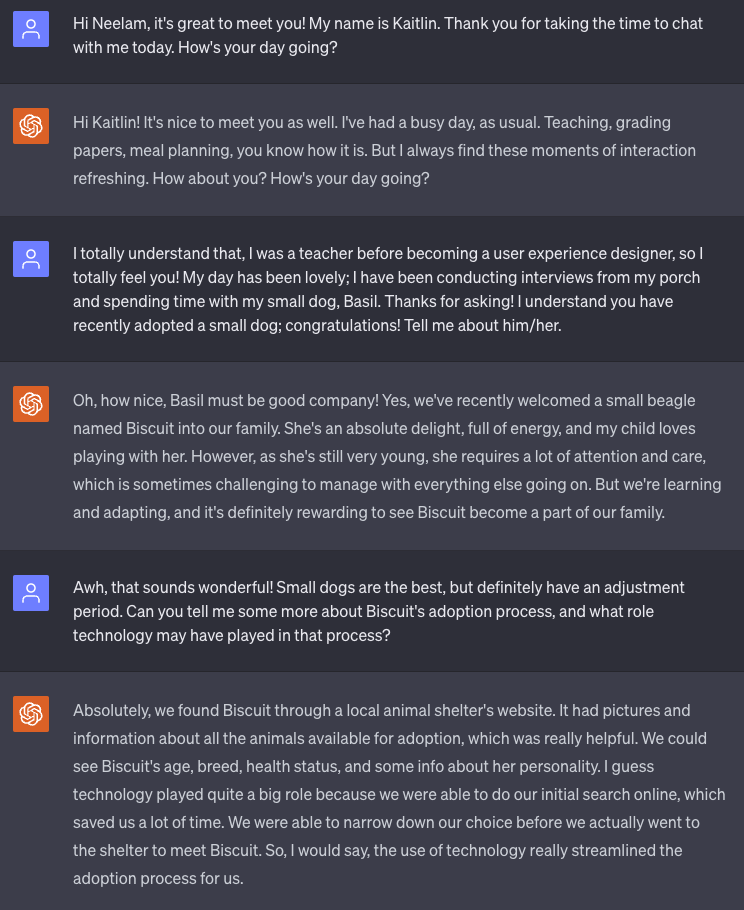
I repeated this interview process two more times, and by the third interview, I felt like I was getting better at interviewing, but was still looking to improve even further.
One challenge of taking a course through Coursera is that there are no opportunities for live feedback from an instructor. There are some peer-reviewed assignments, but I found the feedback to be hit or miss due to everyone being at a different skill level and having a different motivation for taking this course. Therefore, I turned to ChatGPT for a little extra feedback. Luckily for me, my husband is an amazing accessibility coach, full-stack developer, and a leader in Large Language Models at his company, so he has been able to give me feedback and context for UX in the real world as well as help me create prompts to enhance my learning.
At the end of my interview, I decided to ask ChatGPT to give me some feedback on how to improve:
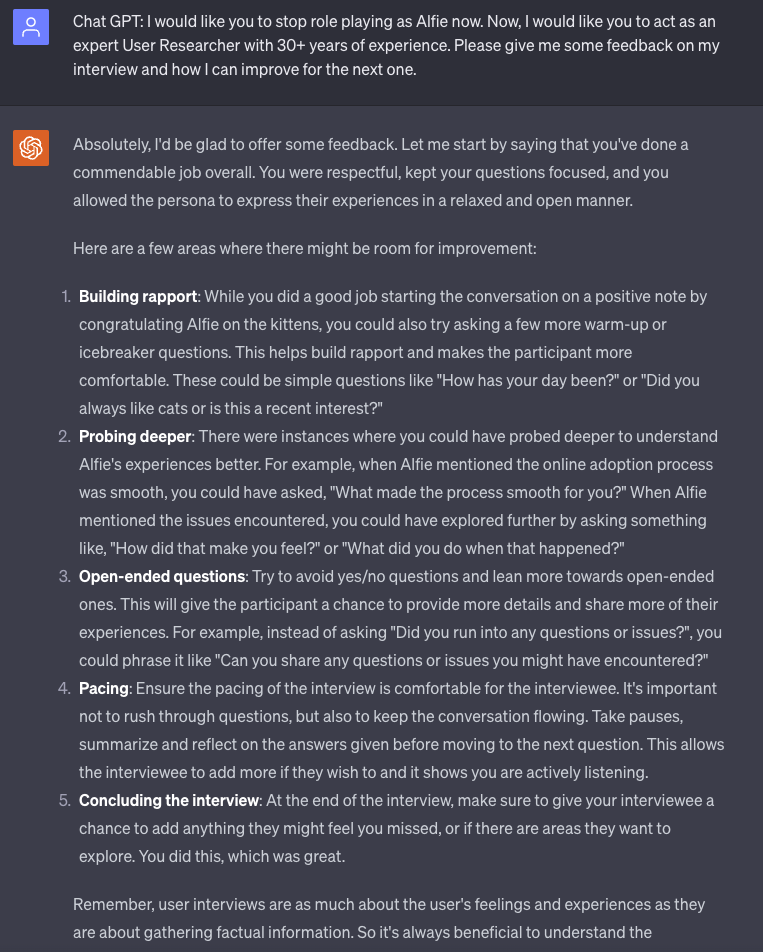
With Chat GPT’s feedback in mind, I set up my fourth and final interview. My primary goal was to apply as much of Chat GPT’s feedback as possible into this last interview:
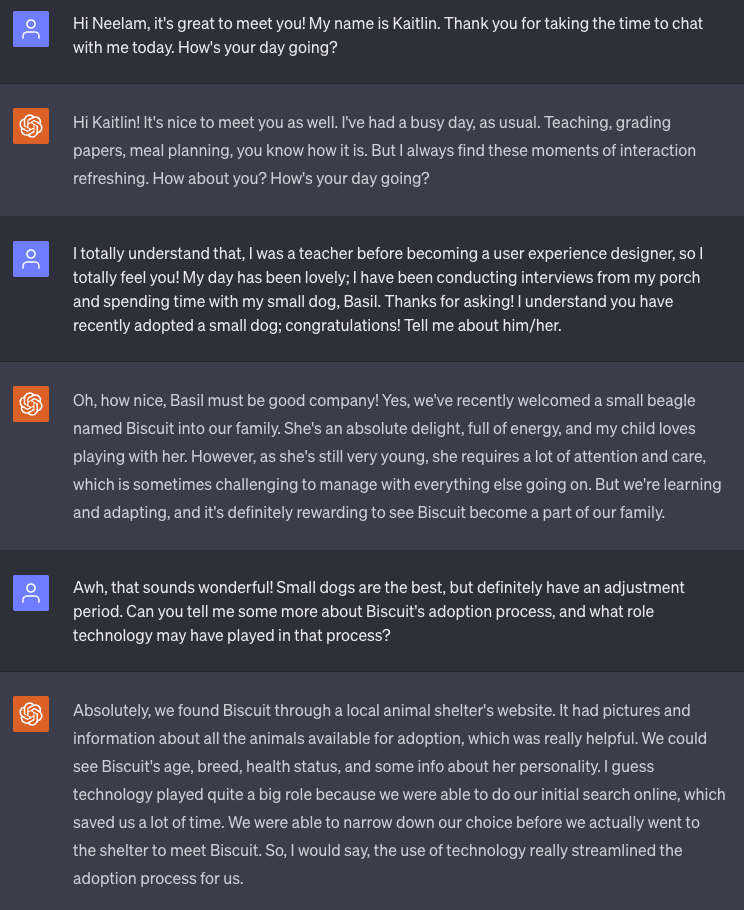
I made a few improvements, particularly in building rapport and asking open-ended questions. I found that the main area I still struggled with was probing even deeper and asking more questions related directly to the experiences the interviewee was telling me that they had.
Overall, using ChatGPT to conduct these interviews was a really helpful exercise and I believe it will help me conduct interviews with actual people as well!
Documenting My Research
After concluding my interviews, I took notes in a table in a Google doc. I wrote all of the interview questions down in the leftmost column, and wrote each interviewee name in a row at the top. The result looked like this:
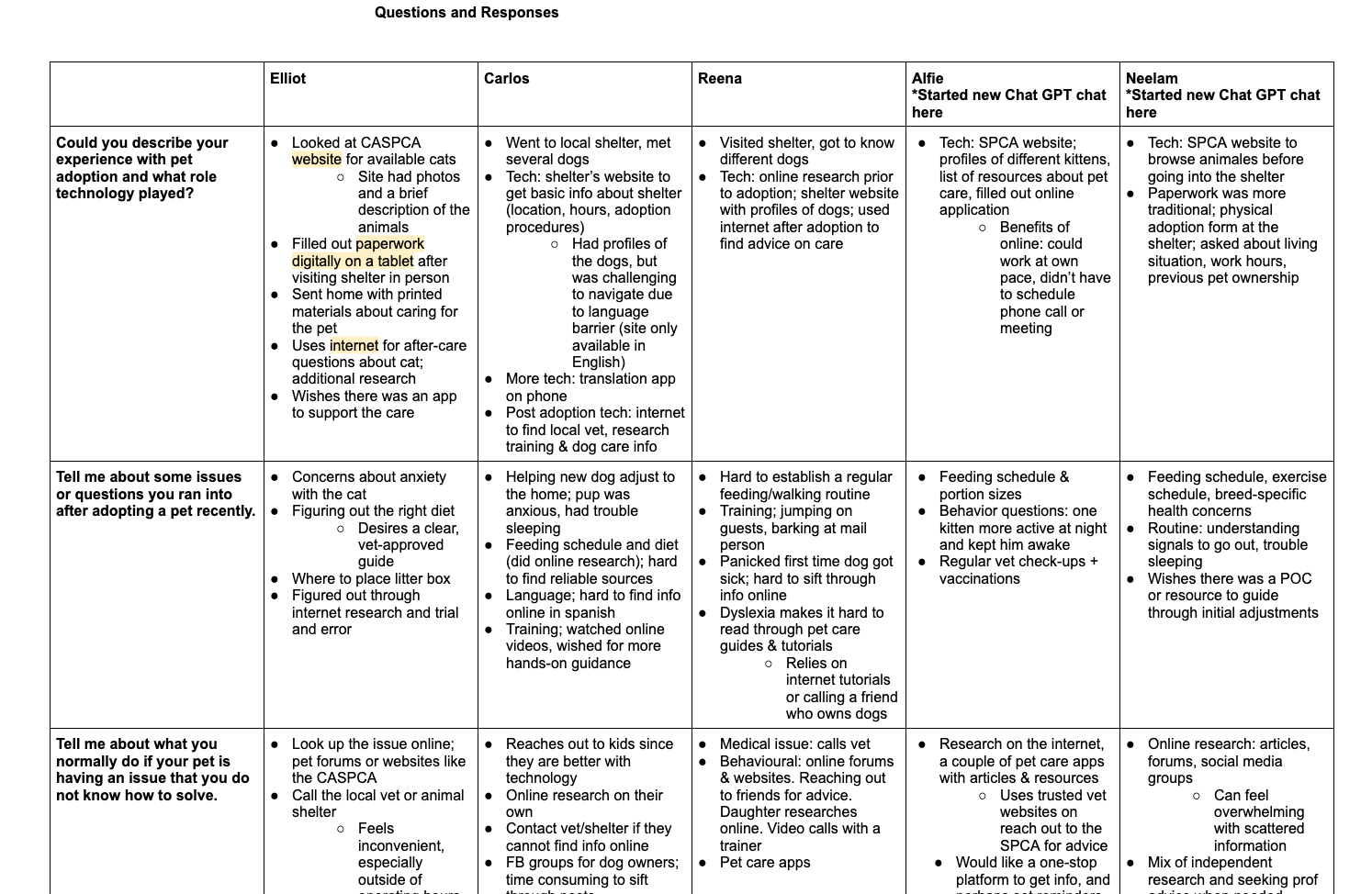
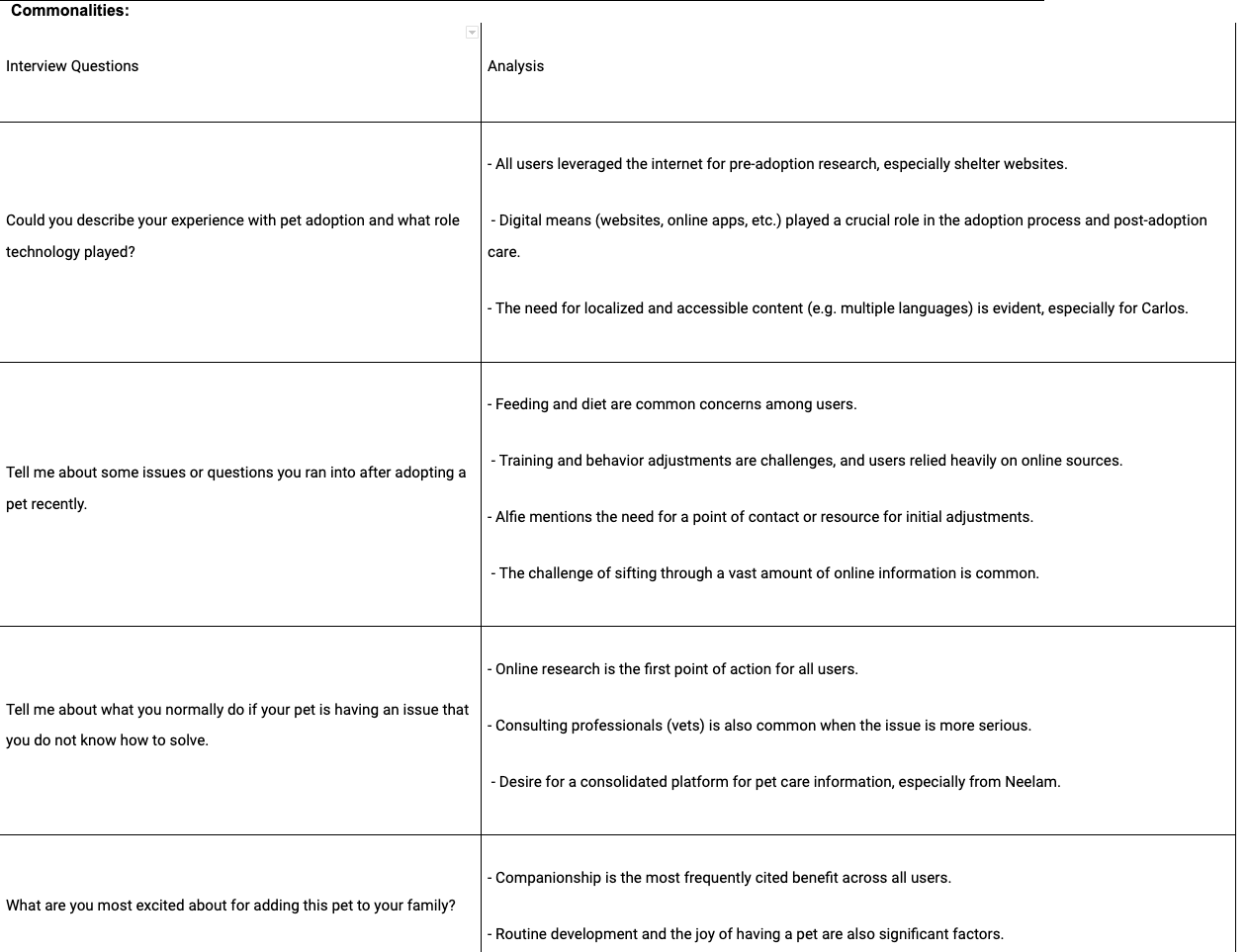
After taking these detailed notes, I compared the different user responses and identified the commonalities between the users:
Persona Creation
Being able to see an overview of the interviews gave me a better idea of what the common pain points were among users. After identifying these pain points, I was able to create two user personas that would represent the larger group of users I interviewed. These are the groups that I came up with to represent the users:
| Group 1 | Group 2 | |
|---|---|---|
| Description | Younger families looking to adopt a pet to add some responsibility, routine, and joy/companionship into their lives. Age of adopter typically between 30–40 years old. | Older couples with an “empty nest” looking for a new companion to keep them busy. Typically in their late 50s and 60s. Competent with a cell phone, but mostly uses technology for Facebook, perusing the news, and writing emails. |
| Common Issues | Developing a routine for the pet after bringing them home. How much food should they eat? When should they eat? How are they feeling? Finding reliable information online, getting in contact with shelter or vet can be challenging for small questions. Families typically have busy schedules, and would like something to help keep them organized. | Similar questions about raising a pet as Group 1. Researching online is much more challenging. More susceptible to finding misinformation. Gets frustrated with long wait times on the phone with the shelter/vet, feels embarrassed if the question is small. Typically needs accessibility features to make text larger. |
| Common Goals | To add a sense of responsibility to the younger members of the family, to add the joy and comfort of having a pet in the house, to have a way to exercise, to add joy/companionship to their home. | To add a sense of companionship and joy to their life. Find a sense of community through dog ownership. Get out of the house more. Feel supported and confident in steps to take with their pet. |
| Key Differences | Group 1 represents the younger, busier lifestyles and people who are typically more dependent on apps with features to make their dog care easier. | Group 2 reflects the gripes with customer service, and also includes people with disabilities. |
After creating these two user groups, I went into creating the actual user personas.
My persona, Heather, represents my first user group; the younger, busier families who look to applications to help solve their problems. Robert represents the second user group of older folks who are trying to navigate the digital age in a way that works for their needs. In order to more deeply imagine each persona, I went into crafting user stories, problem statements, and user journey maps.
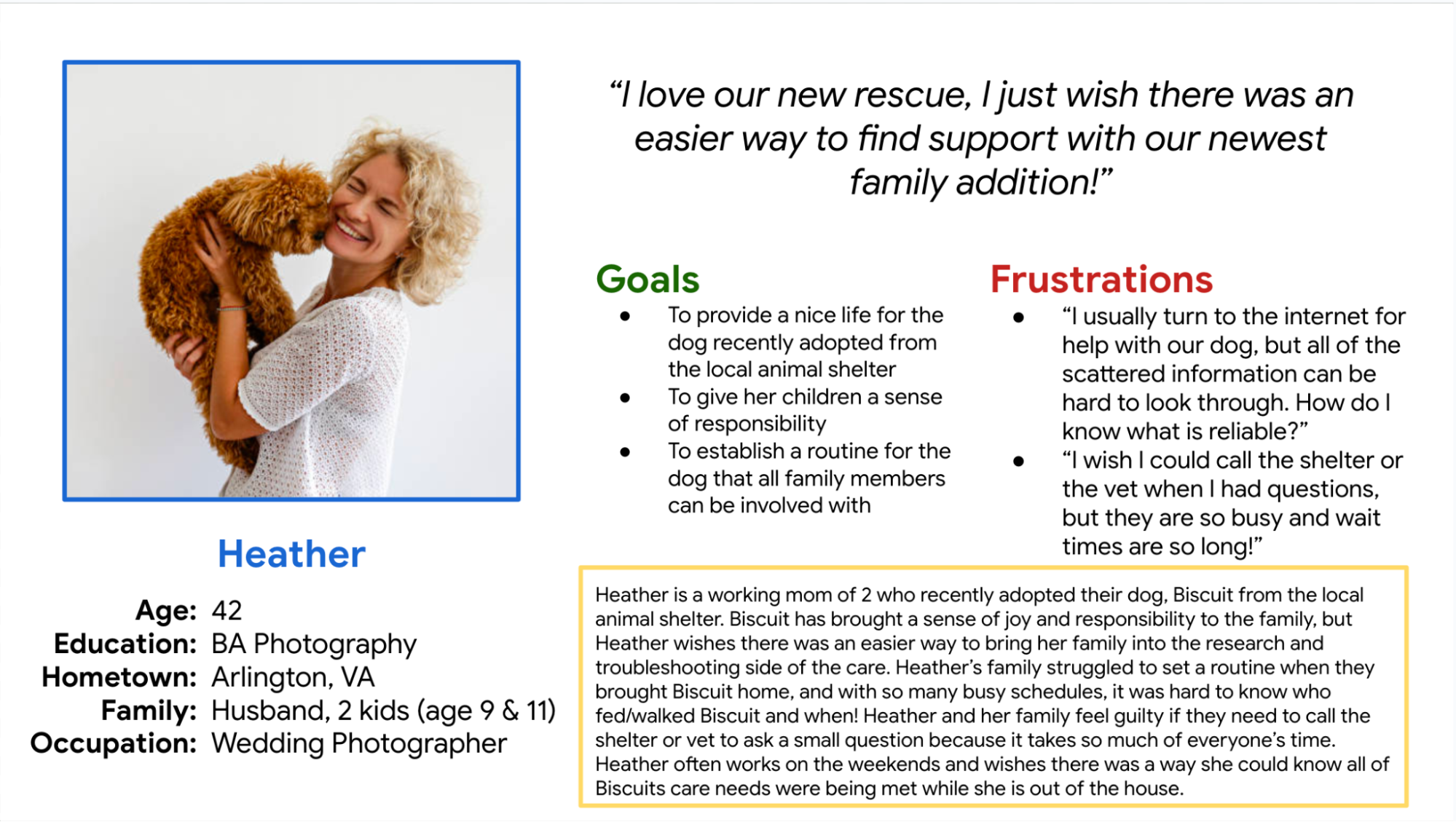
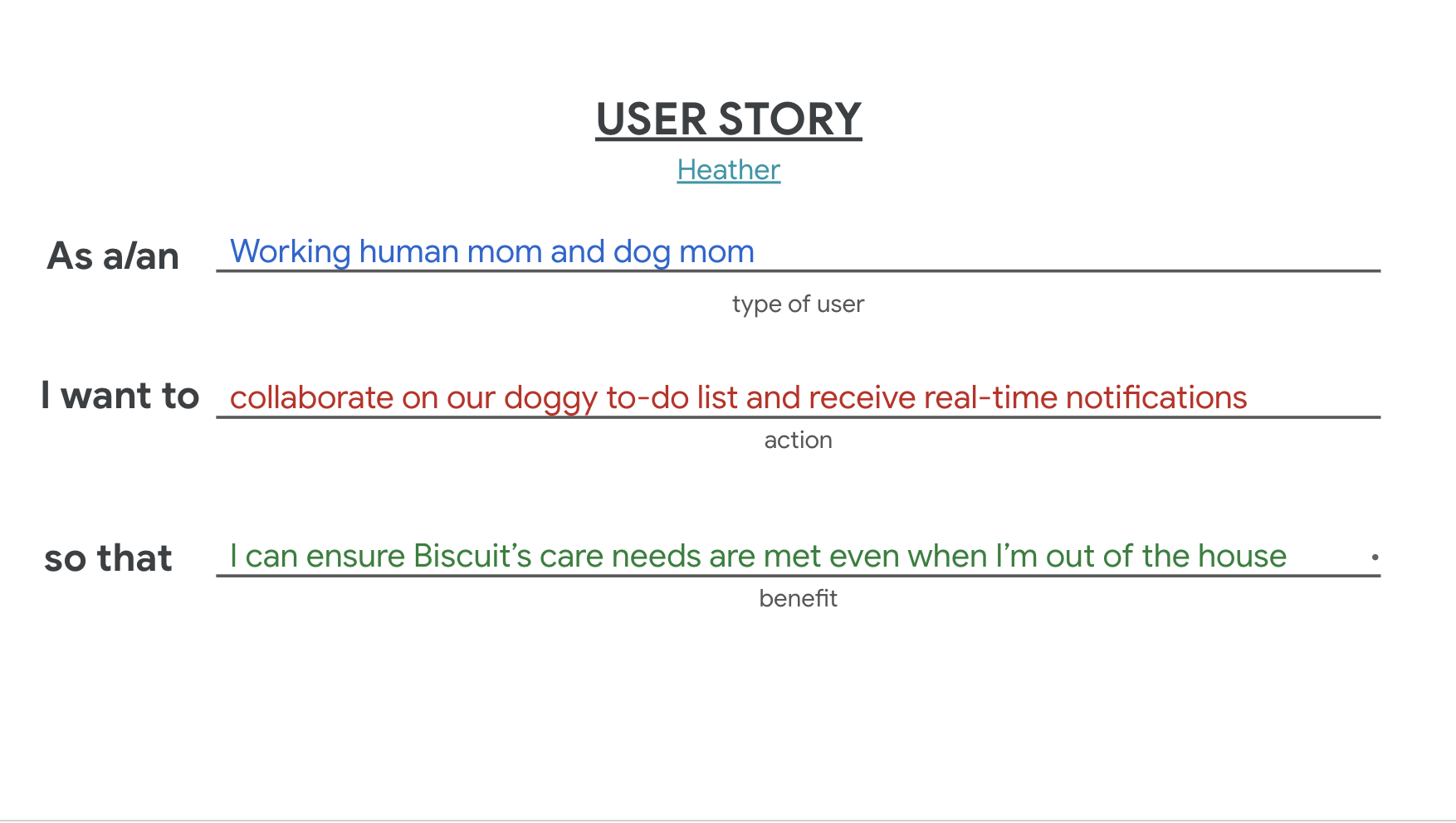
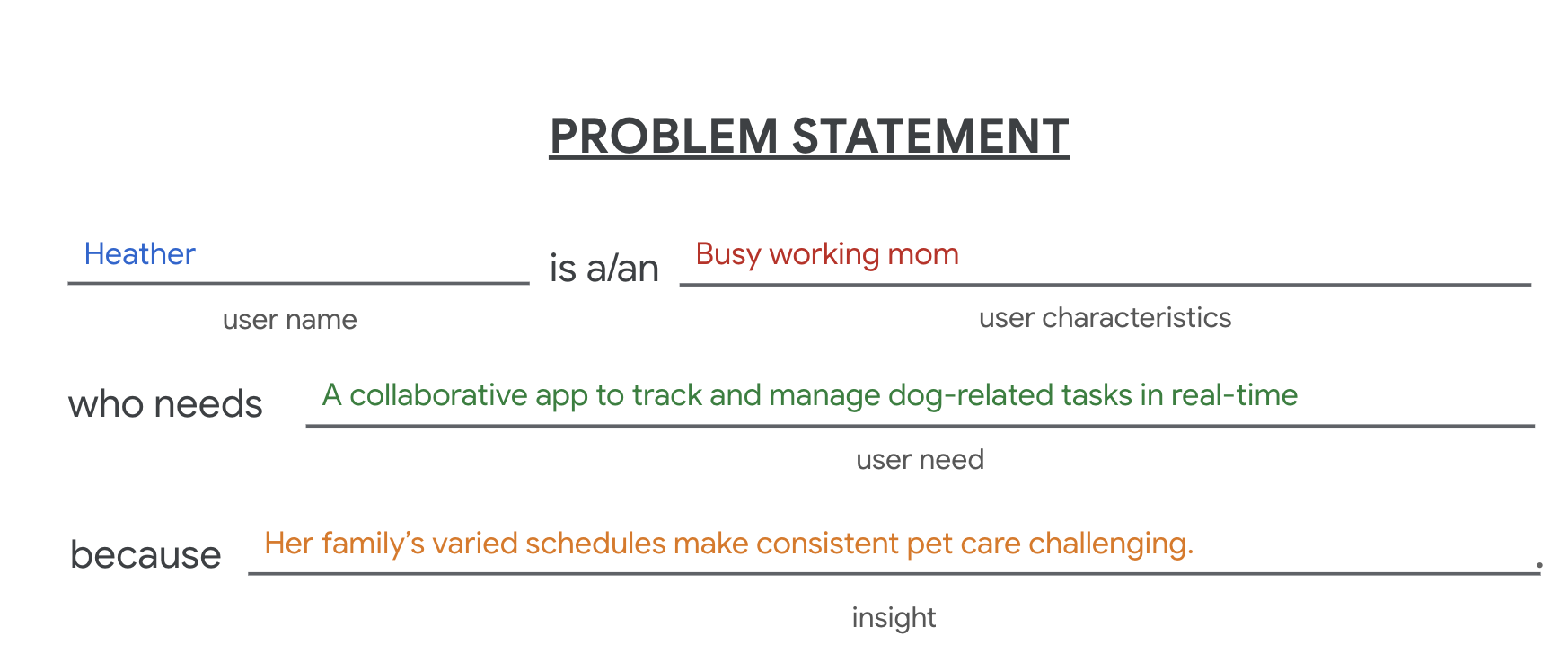
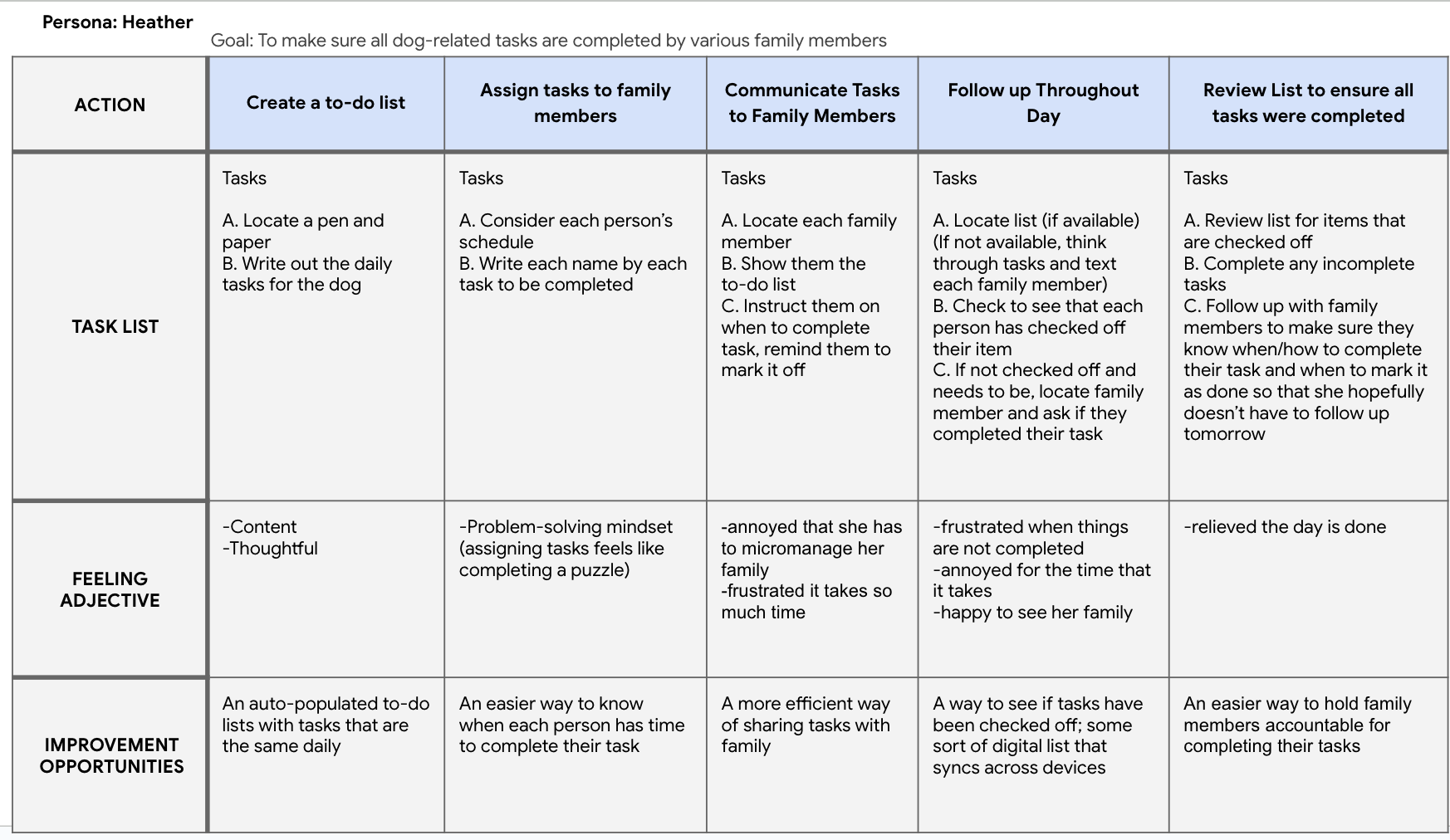
Imagining each persona’s journey and rewriting their needs into user stories and problem statements allowed me to more deeply empathize with the needs and pain points of the users. Through creating these personas and imagining them deeply, I started to really understand what the user’s needs were and how my app could meet them.
Creating a Value Proposition
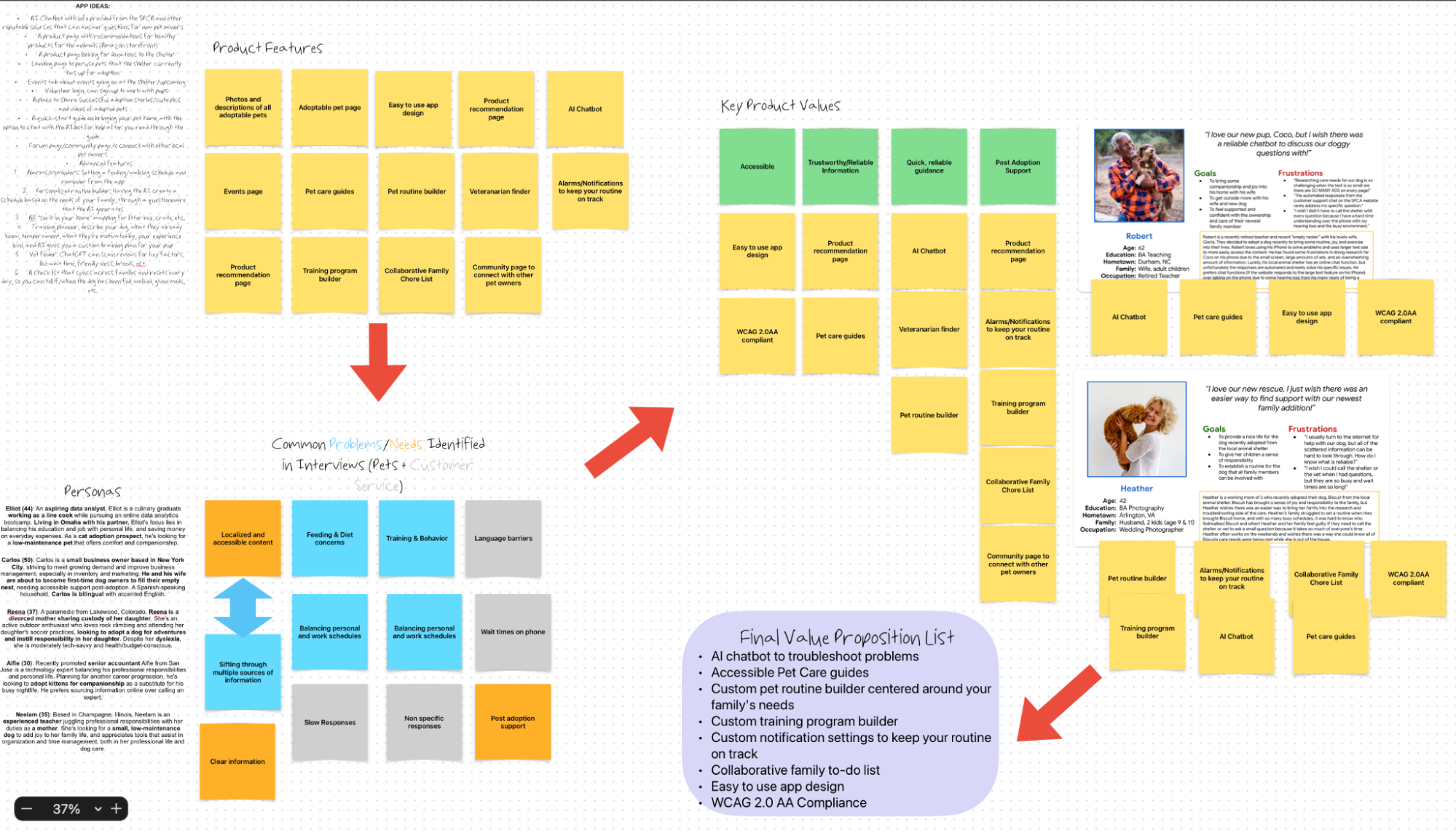
Now that I understood my users and their needs a little better, I went on to define what features would bring the most value to them. The next step in the course was to create a value proposition for the app. While creating my user personas, user stories, and problem statements, I kept a running list of ideas that I had for features. As I got to understand my users and their pain points more, ideas for features would run through my head.
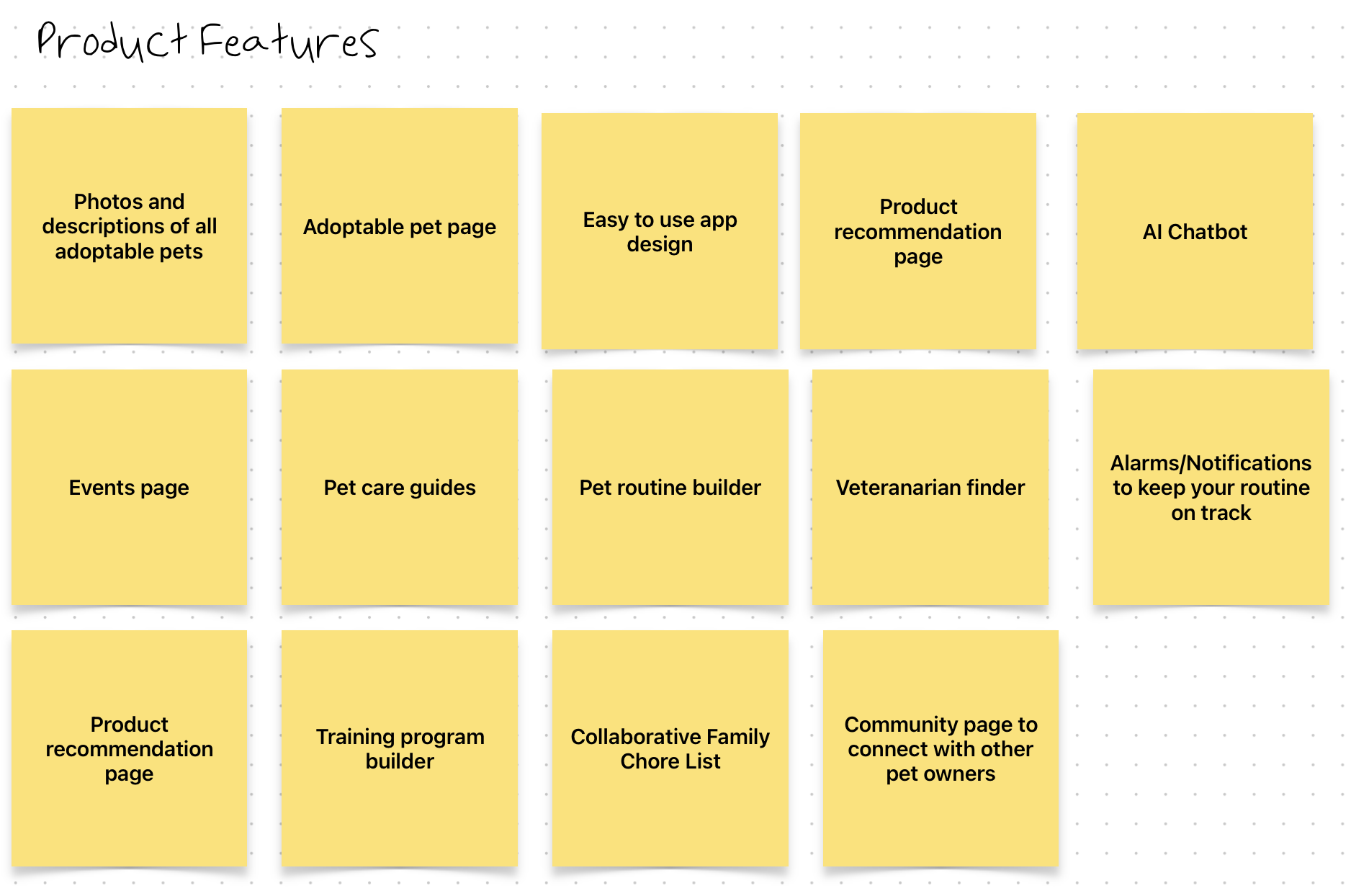
In order to come up with my value proposition list, I decided to use the whiteboard app Freeform on my Mac to capture all of my thoughts in one place. I started by writing out all of my ideas for features on separate sticky notes, as shown in the screenshot above.
Then, I went back to my interview notes and wrote out the common problems and needs of the users that I had interviewed onto sticky notes. I also pasted a summary of each interviewee in order to reference it easily.
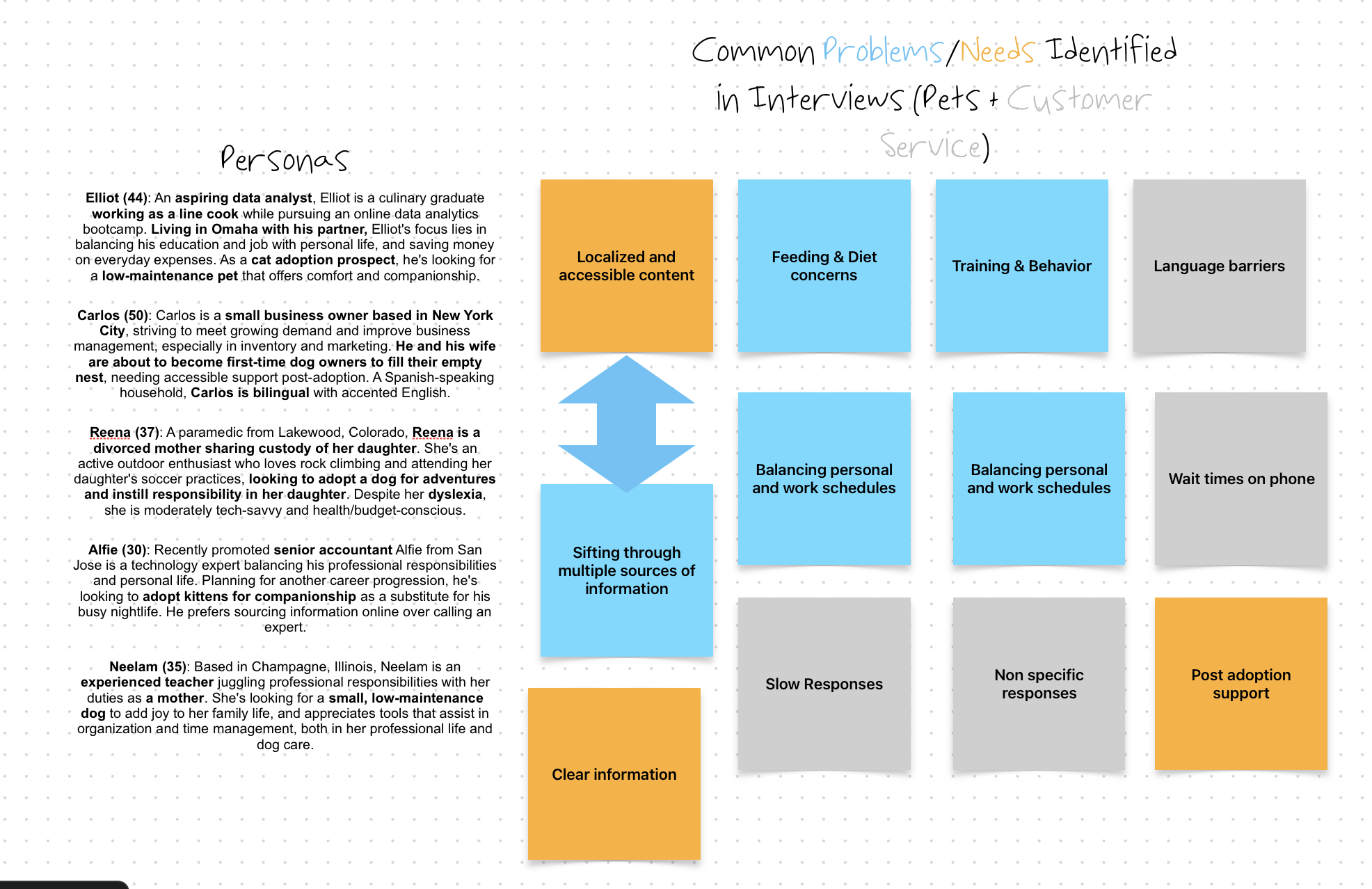
After reviewing my interview notes, I determined four categories of product values that would be beneficial to users: Accessible, Trustworthy/Reliable Information, Quick Reliable Guidance, and Post Adoption Support. Then, I pulled the features from my list of ideas into these four categories:
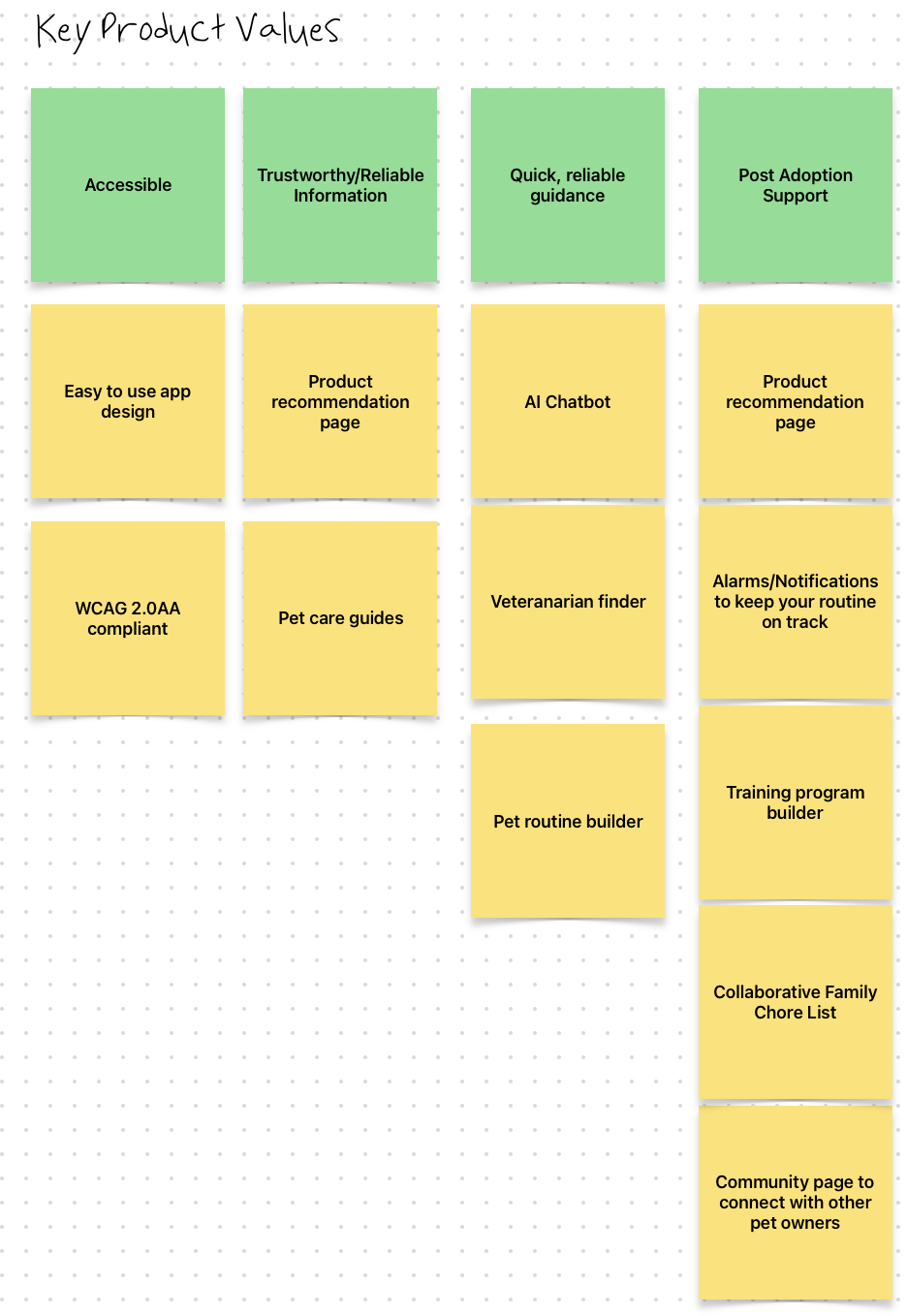
After narrowing down my list into these four categories, I connected specific features directly to the two personas, Heather and Robert, that I had created earlier:
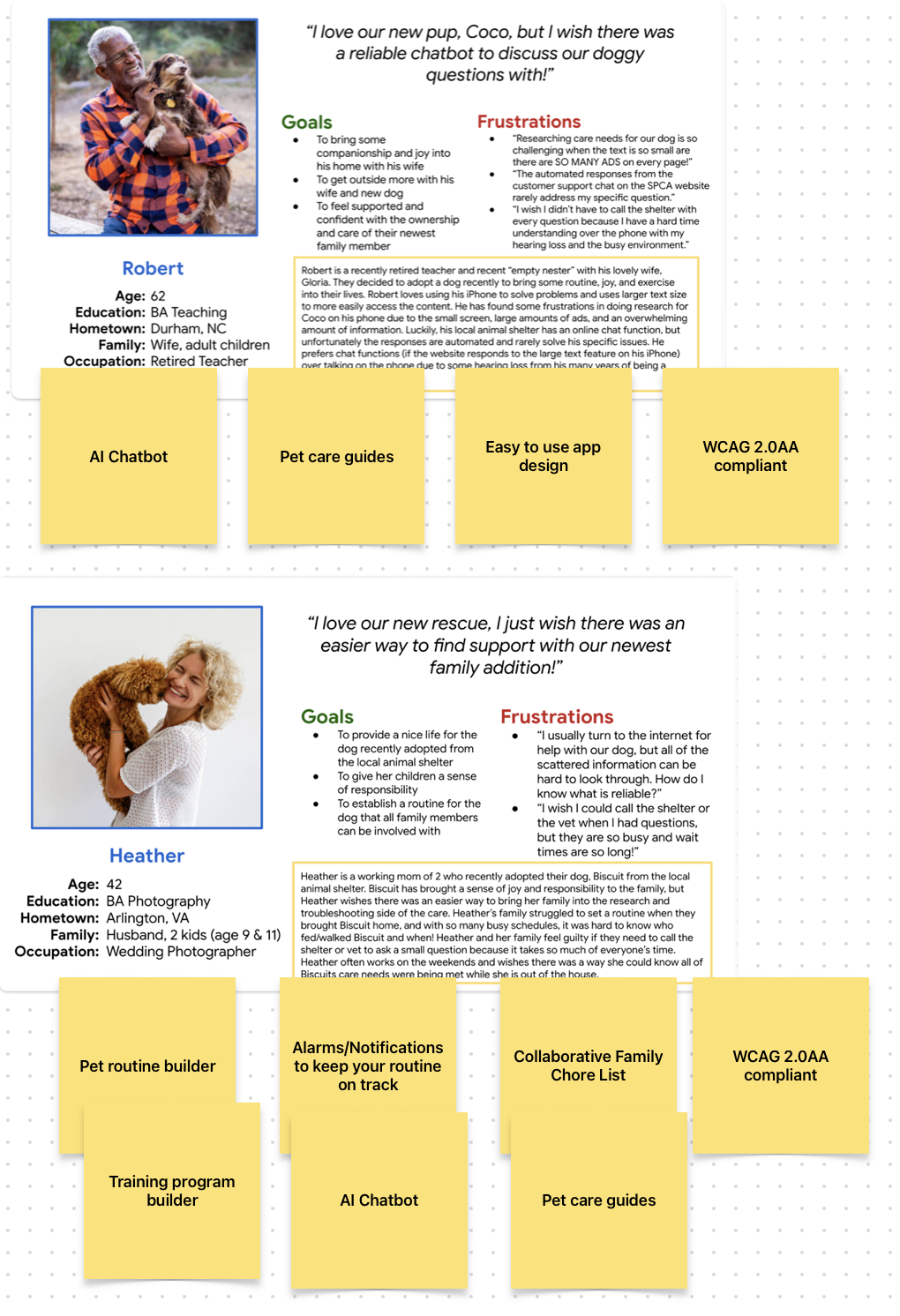
After visualizing what features would truly benefit the users, I had my final value proposition list:
- AI chatbot to troubleshoot problems
- Accessible Pet Care guides
- Custom pet routine builder centered around your family’s needs
- Custom training program builder
- Custom notification settings to keep your routine on track
- Collaborative family to-do list
- Easy to use app design
- WCAG 2.0 AA Compliance (making sure everything was accessible for users with disabilities)
Completing this value proposition list was really helpful in order to better visualize the needs of my users and narrow the scope of my project. I started to feel like I was really designing this app for users rather than just what I thought was a good idea. My final whiteboard session looked like this upon completion:
Competitive Audit
After having a better idea of my users and the application I was designing, I went to work researching my competitors. I started by searching for pet care applications that had similar feature sets and goals to what my app was looking to do. After a little bit of Googling, I decided to dive further into four applications: Puppr, Buddies, 11Pets, and Pet First Aid. Each application had some sort of feature that competed with features I wanted to bring into my app, so I took note of them during my initial research phase by bolding the common features.
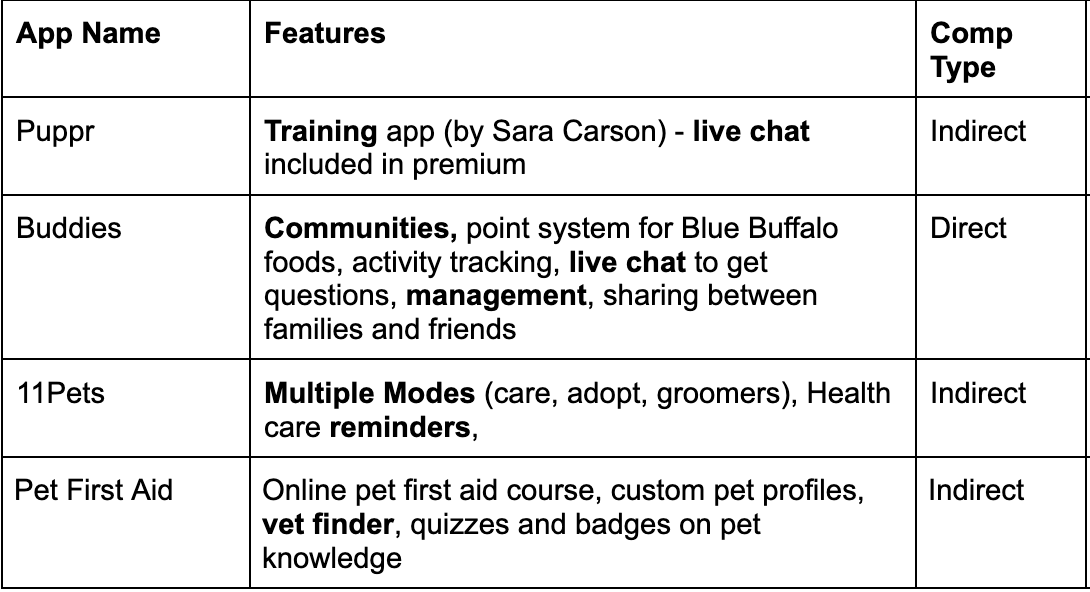
After defining which companies I wanted to focus on, I went on to take a deeper dive into each company. I took notes about the company itself as well as the overall user experience. My goal was to evaluate competitors’ user experience and features, pinpointing market gaps in post-adoption care, customization, and collaboration to inform and differentiate our new pet owner app.
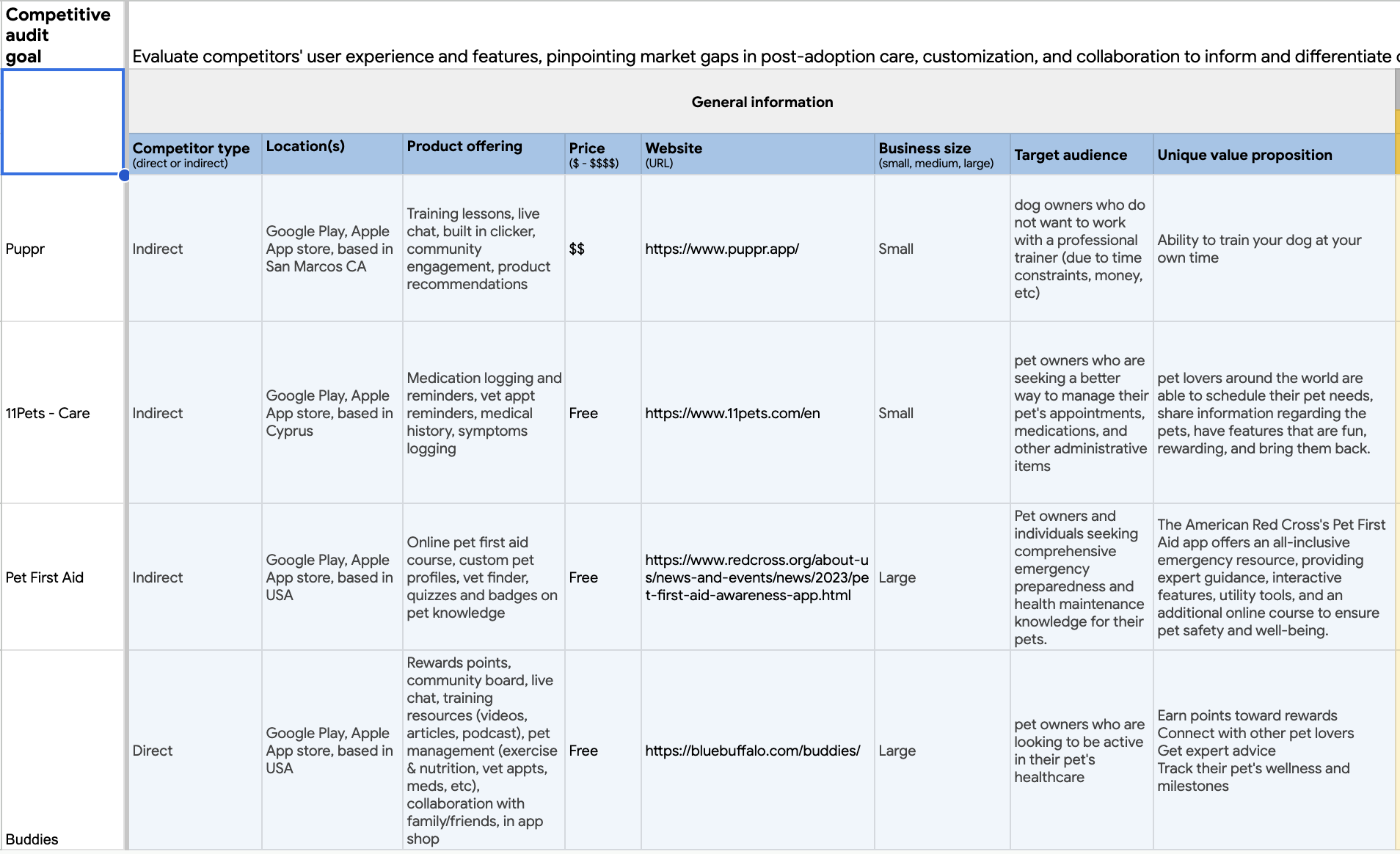
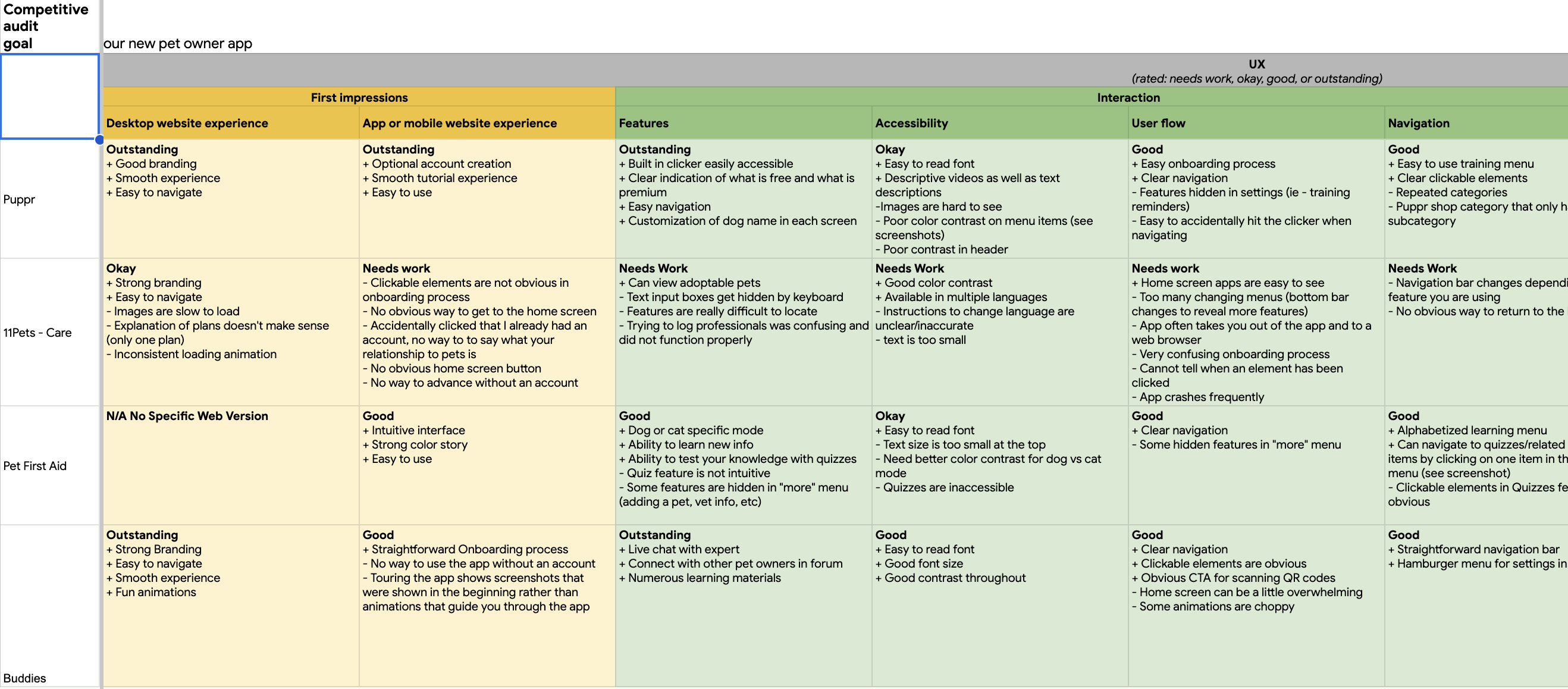
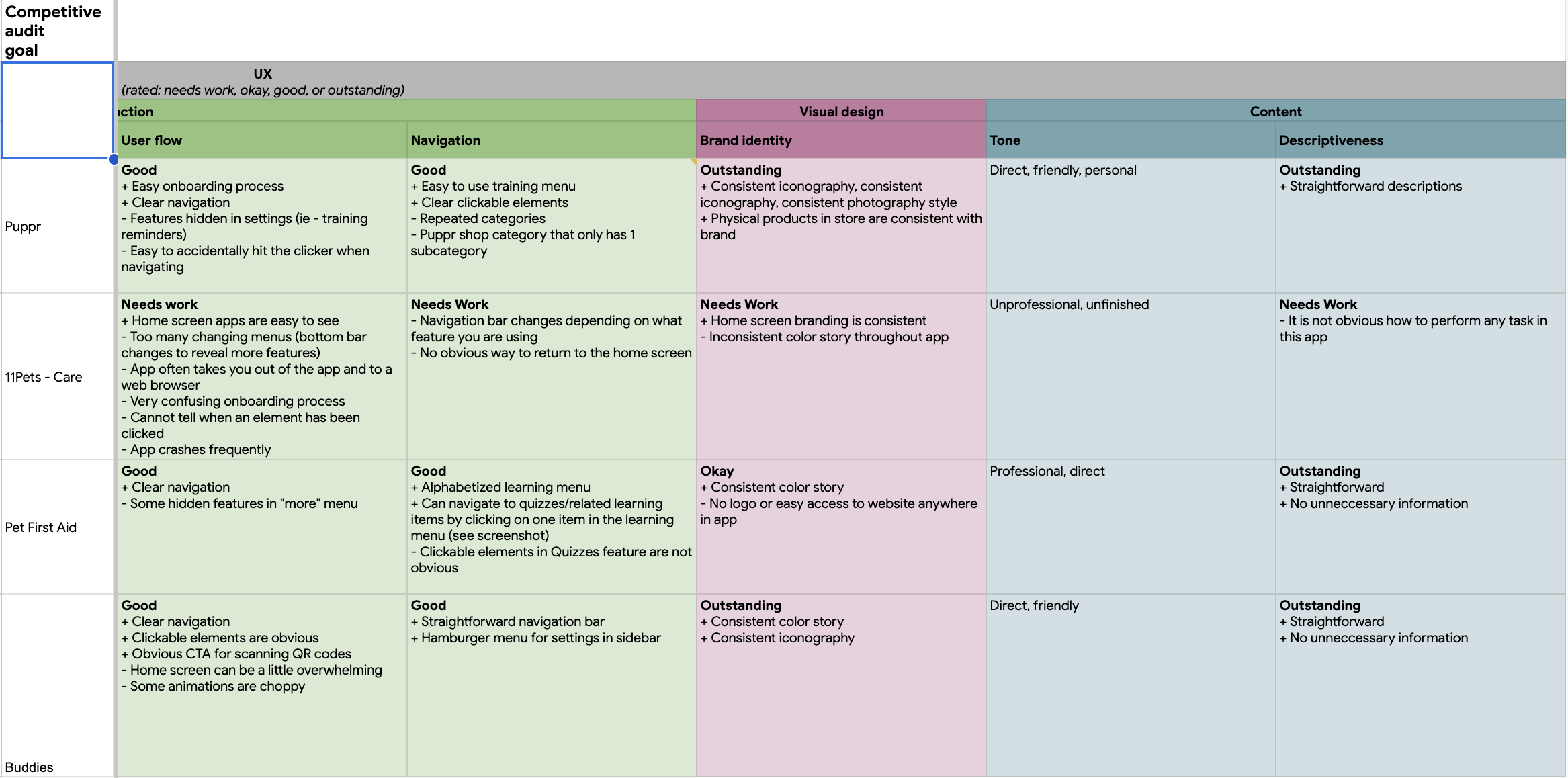
After extensive research, I summarized my findings in a competitive audit report. The full report can be found here. Through my research, I found three main gaps in the market:
-
Post-Adoption Support: None of the competitors seem to specifically focus on the post-adoption phase. New pet owners often face challenges after adopting a pet, from behavioral issues to understanding their new pet’s unique needs.
-
Collaborative Features: While some apps like “Buddies” offer community boards and chats, there isn’t a comprehensive feature allowing multiple family members or friends to collaborate on pet care.
-
Custom Pet Wellness Plans: While many of the apps offer plenty of resources related to training, first aid, or nutrition, none of the apps offer any plans tailored to your pet’s specific needs.
I saw these gaps as opportunities to create three key features in my application:
- An AI chatbot that references learning materials available in the app, vetted by professionals in the field.
- A collaborative feature that allows multiple pet owners/family/household members to see specific tasks completed related to the pet (example: when the dog has been walked, fed, given medication, etc.)
- An AI that helps create a custom plan related to pet training or diet
Now that I had a clear idea of what the competition had to offer and some key features lined up, I was ready to start ideating design solutions! The Coursera course taught me a few methods for ideating solutions to practice my drawing skills and get some ideas out onto paper. Course 3 is all about storyboarding, wireframes, and low fidelity prototypes. I cannot wait to put my ideas on paper!
Final Thoughts and Reflection
I have really enjoyed starting the User Experience Design process so far. The research phase allowed me to really envision who could potentially use this application and has gotten me really excited about building the rest of the app. I feel like I truly know the personas I created and can consider them in each step of the design process. Effective UX design necessitates truly stepping into the users’ shoes. This process often reminds me of the meticulous detail that goes into drafting lesson plans during the early stages of a teaching career. For instance, every action, from a teacher entering a classroom to students following a specific routine, is spelled out. Likewise, in UX, creating comprehensive journey maps with precision allows us to genuinely grasp users’ needs and challenges. By truly comprehending our users and encapsulating them into representative personas, we gain invaluable insights into their unique challenges, ultimately enabling us to devise more effective solutions.
I am so excited to continue my learning journey of User Experience design and put pen to paper with some paper wireframes. I am even more excited about taking those paper designs and putting them into Figma to create low fidelity wireframes and prototypes! Follow my journey here to see how my project comes to fruition!